
Cloud-Based Fitness Management Software
Introduction
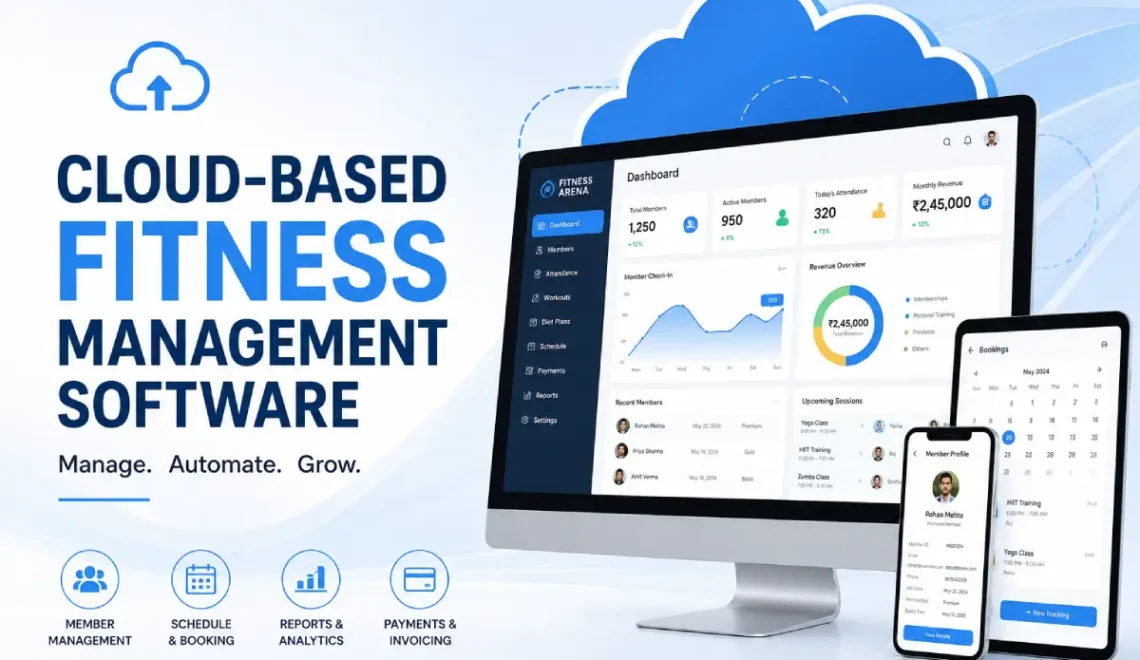
The fitness industry has made the move towards the digital realm as gyms, health clubs, fitness studios and personal trainers can now streamline business operations through an easy-to-use technology-based system. Fitness management software, based in the cloud, provides fitness businesses and personnel with a viable means of tracking memberships, booking classes, making and receiving payments, managing staff schedules, communicating with clients and more via a centralized location on the internet. From the sole personal trainer to the multi-facility health club owner, cloud technology is available to improve efficiency and offering greater flexibility compared to other traditional systems.
This Article Is Part of the Fitness Technology Hub
Discover the latest fitness technology, including smartwatches, fitness trackers, wearable devices, health monitoring tools, AI-powered workout apps, and smart gym equipment in our Fitness Technology Hub.
What Is Cloud-Based Fitness Management Software?
Cloud based fitness management software is a web based program that enables fitness companies to control and organize their businesses over a device that uses the internet. The software is stored in the cloud so the records are kept secure, allowing the owners, employees and members to retrieve information from anywhere and have it updated simultaneously.
A cloud based fitness management system has been designed to move away from manual systems and separate files
Common functions include:
- Membership management
- Online class scheduling
- Attendance tracking
- Billing and invoicing
- Trainer management
- Customer relationship management
- Reporting and analytics
- Mobile access
People do not have to keep information on their computer anymore. The data is kept safe on computers that’re far away and people can look at it using the internet or special programs on their phone.
How Cloud Gym Software Works
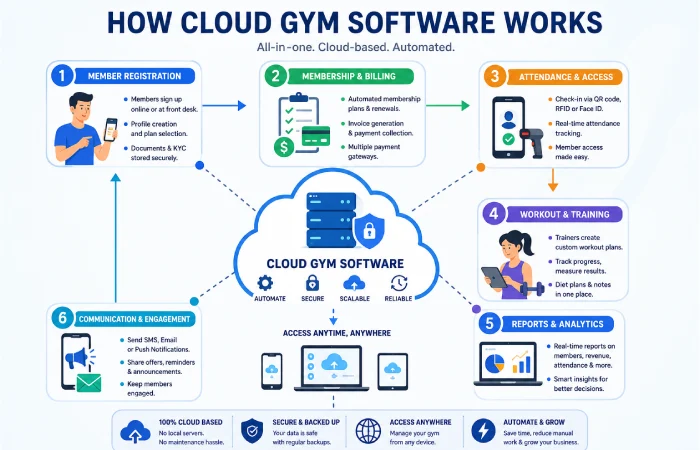
A modern cloud gym software platform stores all operational information in one location.
This may include:
- Member profiles
- Payment records
- Class schedules
- Trainer assignments
- Attendance logs
Changes made by staff are typically updated across connected devices in real time.
Multi-Device Access
Users can often access the platform through:
- Desktop computers
- Laptops
- Tablets
- Smartphones
The gym managers and trainers can work from else when they need to. This is really helpful for the gym managers and trainers because they have the flexibility to do their job from another location. The flexibility is great, for the gym managers and trainers.
Unique functions of the Online fitness management system
Membership Management
The system helps businesses:
- Register new members
- Track renewals
- Monitor active memberships
- Appointment & Class Scheduling
- Be able to manage cancellations
Many platforms provide booking systems that allow members to reserve classes online.
Payment Processing
Features often include:
- Subscription billing
- Invoice generation
- Payment reminders
- Revenue tracking
Attendance Tracking
Businesses can monitor:
- Daily check-ins
- Class participation
- Member activity trends
Reporting and Analytics
Dashboards may provide insights into:
- Membership growth
- Revenue performance
- Retention rates
- Attendance patterns
SaaS Gym Management System Benefits
Reduced Administrative Work
A SaaS gym management system automates many repetitive tasks, reducing manual paperwork.
Improved Member Experience
Members may benefit from:
- Online bookings
- Automated reminders
- Digital payments
- Mobile account access
Easier Multi-Location Management
Businesses operating multiple branches can manage operations from a single dashboard.
Automatic Software Updates
Cloud providers generally handle system maintenance and updates without requiring manual installation.
Typical Cloud Fitness Platform Features
| Feature | Typical Availability |
| Cloud Storage | Yes |
| Mobile Access | Yes |
| Membership Tracking | Yes |
| Billing Tools | Yes |
| Attendance Monitoring | Yes |
| Reporting Dashboard | Yes |
| Staff Management | Often Included |
| Multi-Location Support | Common |
| Customer Messaging | Common |
| API Integrations | Platform Dependent |
Web Based Fitness Software vs Traditional Software
| Feature | Web Based Fitness Software | Traditional Desktop Software |
| Internet Access Required | Usually Yes | Not Always |
| Remote Access | Excellent | Limited |
| Software Updates | Automatic | Manual |
| Initial Setup | Faster | Often More Complex |
| Hardware Dependency | Lower | Higher |
| Multi-Location Support | Strong | Variable |
| Scalability | High | Moderate |
When a business is growing it is really helpful to use systems that are based in the cloud. This is because cloud-based systems give businesses the ability to change and grow easily. The business can get bigger. The cloud-based system can handle it. Cloud-based systems are very good, for growing businesses because they are flexible and can scale up.
Cloud Fitness Platform Workflow
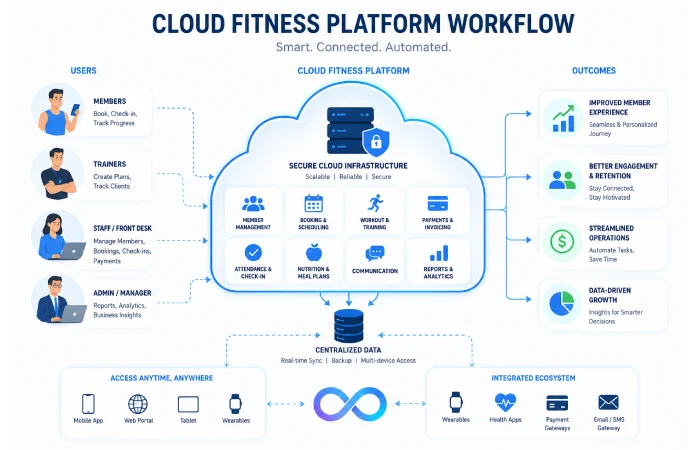
Step 1: Registering a Member:
New members create a profile by filling out and submitting the registration form.
Step 2: Activating a Membership:
The software then creates a membership file and a payment file.
Step 3: Booking a Class:
A member books an online class using scheduling software.
Step 4: Checking into a Class:
When a member shows up, he/she is automatically checked into the system.
Step 5: Billing & renewals.
All members receive automated recurring billing and timely reminders.
Step 6: Reporting.
Management can keep track of their organization’s performance with reporting dash boards.
Performance Expectations
The company’s performance will increase as the company gains speed due to the usage of cloud software.
Potential Benefits
- Faster administration
- Better record organisation
- Improved reporting visibility
- Enhanced member convenience
Possible Limitations
- Dependence on internet connectivity
- Monthly subscription costs
- Staff training requirements
- Data migration challenges during implementation
When you use software the results you get often depend on how you set it up and how well the staff use it.
Cloud technology continues to transform fitness business operations by improving member management, scheduling, billing, and operational efficiency. The Health & Fitness Association (formerly IHRSA) provides industry research, technology insights, and best practices for fitness facility owners seeking to modernize their operations and improve member experiences. Learn more at https://www.healthandfitness.org/
Pros & Cons of It
Pros
- Accessible from multiple devices
- Scalable for business growth
- Automatic updates
- Centralised data management
- Supports remote operations
Cons
- Internet reliance
- Ongoing subscription expenses
- Vendor dependency
- Learning curve for staff
You need to think about advantages and disadvantages prior to implementing.
Who uses the cloud-based fitness software?
Ideal For
- Independent gym
- Fitness studios
- Yoga centres
- Cross-training facilities
- Personal training businesses
- Multi-location fitness brands
Less Suitable For
- Businesses with no internet access
- Facilities requiring highly customised offline systems
- Organisations with minimal digital management needs
Security and Legitimacy Considerations
When evaluating software providers, consider:
- Data Security
- Look for features such as:
- Encryption
- Secure logins
- Backup systems
- Access controls
Compliance
It should be important for service providers to have transparent policies for both privacy and how data is processed.
Vendor Reputation
Review:
- Customer feedback
- Industry experience
- Support availability
- Product development history
A good software company should be honest about how they keep things safe and what they promise to do for you. They should tell you what they are doing to protect your information and what you can expect from them. A legitimate software provider like this should be open, about their security measures and the service they provide.
Alternative cloud fitness management software
Businesses could also explore:
Desktop fitness software
Installed locally on business computers.
Spreadsheet-Based Management
Suitable only for very small operations with limited complexity.
Custom-Built Systems
Developed specifically for individual business requirements.
Hybrid Solutions
Integrate cloud access and local data storage.
Each offers varying levels of expense, flexibility and maintenance.
Fitness business owners’ buying tips
Before choosing a platform:
- Pinpoint your needs
Decide what you require:
- Membership management
- Scheduling
- Billing automation
- Trainer management
- Reporting tools
Request Demonstrations
Product demos can reveal usability strengths and limitations.
Consider Scalability
Choose software capable of supporting future growth.
Review Support Options
Assess:
- Training resources
- Customer support availability
- Technical documentation
- Compare Total Costs
Evaluate:
- Subscription fees
- Setup costs
- Integration expenses
- Additional feature charges
Common Challenges During Implementation
Businesses may encounter:
- Data migration issues
- Staff training needs
- Process adjustments
- Brief interruptions to workflow
When you plan things properly the process of introducing something can go really well. This is because you have thought about the introduction process and you know what you are doing. The introduction process is something that needs to be done so it is good that you can make the introduction process run smoothly with some planning.
Regularly Asked Questions
What is cloud-based fitness management software?
Cloud-based fitness management software is a fitness business management tool available online via Internet-enabled devices. This online system supports various fitness businesses with membership and booking management, payment collection, attendance and operations data management.
Is cloud gym software good for small gyms?
Yes. Many small gyms use cloud software for its administrative support, ease of management and business development.
Is a cloud fitness platform safe?
It all depends on the provider. The leading vendors utilize methods like encryption, data back-ups and access control.
Can personal trainers use a SaaS gym management system?
Yes. Many systems offer features suitable for independent trainers and coaching businesses.
Does web based fitness software require installation?
Most cloud platforms operate through web browsers and mobile applications, reducing installation requirements.
Automated Fitness Management System Hub
Explore software features, gym membership tools, AI solutions, billing systems, cloud platforms, and fitness apps.
Conclusion
Cloud based fitness management software is an essential part of operating a modern fitness business. Integrating aspects of membership management, class and appointment scheduling, billing, reporting and customer communication all into one system could facilitate daily operations and lead to a more organized and efficient business. While setup takes a plan and ongoing monthly fees must be considered, a variety of gyms, studios and trainers enjoy the scale and flexibility that cloud software provides over installed software options.